
TL;DR:
- Branded video step-by-step formats divide a single shoot into multiple platform-specific edits for different funnel stages. They require clear brand assets, suitable editing tools, and organized media to ensure consistency and efficiency. This approach improves engagement, messaging clarity, and reduces waste across the full marketing funnel.
Step by step branded video formats are a production system that breaks a single shoot into multiple platform-specific edits, each designed for a distinct funnel stage and audience behaviour. Rather than producing one video and hoping it works everywhere, this approach treats each cut as a deliberate creative decision. Tools like DaVinci Resolve, CapCut Pro, and HeyGen support the workflow, while brand asset systems keep every edit consistent. Marketers and content creators who adopt this method report stronger engagement, clearer messaging, and far less wasted production budget. This guide walks through the full process, from pre-production setup to funnel alignment and common pitfalls to avoid.
What tools and assets do you need before production?
The foundation of any branded video system is a documented brand identity. Before a single frame is shot, you need a locked brand kit: logos in multiple formats, a defined colour palette, approved typefaces, and a library of approved music or sound design. Without this, every edit becomes a negotiation rather than an execution.

Editing software choices shape your workflow significantly. DaVinci Resolve handles colour grading and multi-timeline exports at a professional level. CapCut Pro suits faster social-first workflows with built-in caption tools and aspect ratio presets. For AI-assisted production, HeyGen's structured process guides creators through brand system setup, scene-by-scene wireframing, script refinement, and export, making brand consistency repeatable at scale.
Asset organisation is equally critical. A digital asset management system, whether that is Frame.io, Dropbox, or a structured folder hierarchy, keeps raw footage, b-roll, product shots, and scripted prompts accessible across your team. Consistent tagging vocabularies and metadata structures reduce the time spent hunting for clips and make multi-platform export pipelines far more reliable. That discipline pays off when you are producing five or six cuts from one shoot.
Pro Tip: Shoot a dedicated "brand close" sequence on every production day: logo reveal, product hero shot, and a clean end card. This single sequence drops into every cut without reshooting and keeps your brand identity consistent across the entire video stack.
The asset types you need on shoot day include:
- Hero product shots in both landscape and vertical framing
- B-roll footage that works as cutaways at multiple lengths
- Scripted prompts for hook lines, product context, and calls to action
- A clean audio recording of any voiceover or presenter dialogue
How to break one shoot into a full branded video stack
The concept of the "film stack" is the core method behind effective step by step branded video formats. Building a branded film stack means producing multiple cut lengths from one shoot, each designed for a specific placement and funnel stage. D2C Times specifies placement-specific behavioural intent for each cut, warning that simply reboxing landscape footage to vertical is insufficient. Each format requires its own framing decisions made before and during the shoot.
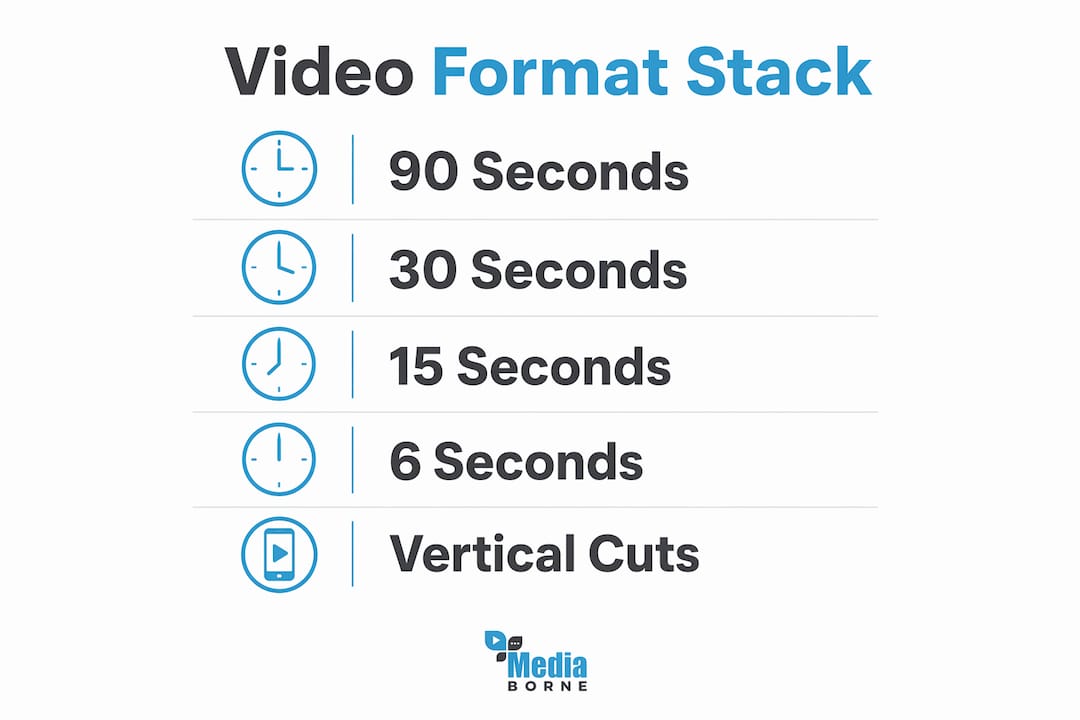
The standard stack looks like this:
- 60–90 second full film. This is your brand story. It carries the full narrative arc: hook, problem, product context, transformation, and brand close. It lives on YouTube, your website, and paid social at awareness stage.
- 30 second consideration cut. Strip the full film to its most persuasive middle section. The viewer already knows the category; this cut answers "why this brand?" It works on YouTube pre-roll and Facebook mid-funnel.
- 15 second performance cut. Pure offer and proof. Hook in the first two seconds, product benefit, call to action. TikTok and Instagram Reels are the primary placements.
- 6 second bumper. Brand recall only. One visual, one line, one logo. YouTube bumper ads and display pre-roll.
- Vertical native recuts (9:16). Every cut above needs a vertical version shot with vertical framing in mind, not cropped from a landscape master. Platform sweet spots sit at 15–30 seconds on TikTok and Instagram Reels and 30–90 seconds on YouTube Shorts.
The comparison below shows how narrative function shifts across the stack:
| Cut length | Narrative function | Primary platform |
|---|---|---|
| 60–90s | Full story arc | YouTube, website |
| 30s | Brand differentiation | Facebook, YouTube pre-roll |
| 15s | Offer and proof | TikTok, Instagram Reels |
| 6s | Brand recall | YouTube bumpers |
| Vertical recut | Platform-native engagement | TikTok, Reels, Shorts |
Pro Tip: Plan your shot list around the 15 second cut first. If you cannot tell the story in 15 seconds, the longer cuts will also feel unfocused. Work outward from the tightest constraint.
Production decisions on framing and format are best made before and during the shoot rather than adapting content afterwards. That single principle saves more budget than any post-production fix.
What editing and pacing techniques maximise short-form engagement?
Pacing is the most underestimated variable in branded video performance. The 2026 pacing target for short-form videos under 60 seconds is a visual change approximately every 1.5–2 seconds. Retention drops when pacing slows beyond 2.5 seconds per visual change, and the edit feels noisy below 1.2 seconds. That narrow window demands deliberate editorial decisions on every cut.
Visual changes do not mean only hard cuts. Layering changes beyond hard cuts through camera moves, text animation, zooms, and colour shifts maintains stimulus density without making the edit feel choppy. A text overlay appearing at 1.8 seconds counts as a visual change. A subtle zoom push counts. This approach keeps the viewer's attention without sacrificing the coherence of your brand story.
Captions are no longer optional. 85% of mobile feed video plays occur on mute, which means captions function as the primary audio track for the majority of your audience. Burn captions directly into the video rather than relying on platform auto-captions, which are unreliable and often poorly timed. Keep caption text short: three to five words per reveal works best. Effective caption timing ties keyword reveals roughly one frame after spoken audio, reinforcing the caption as a secondary narrative track rather than competing with the visual.
Key editing disciplines for short-form branded video:
- Open with your strongest visual in the first two seconds, not a logo or title card
- Use caption animation styles that match your brand typeface and colour palette
- Export separate caption files alongside burned-in versions for platforms that support both
- Build export templates in DaVinci Resolve or CapCut Pro for each platform spec to reduce manual resizing
How to align your video formats with marketing funnel stages
Aligning branded video formats to funnel stages is foundational for measurable marketing success, not an optional refinement. Adobe's full-funnel guidance maps video type and distribution directly to business goals at each stage. The framework is clear: storytelling videos at awareness, educational content at consideration, offer-driven cuts at conversion, and community-style content for retention.
Each stage demands a different creative contract with the viewer:
- Awareness. The viewer does not know your brand. Lead with emotion, story, or a surprising visual. Metrics to watch: view-through rate and brand recall lift.
- Consideration. The viewer knows the category. Educate them on your specific advantage. Product demonstrations, comparisons, and founder stories work well here. Metrics: watch time and click-through rate.
- Conversion. The viewer is close to a decision. Remove friction. Show social proof, a clear offer, and a direct call to action. Metrics: conversion rate and cost per acquisition.
- Retention. The customer has bought. Community content, behind-the-scenes footage, and user-generated content formats build loyalty. Metrics: repeat purchase rate and share rate.
Ongoing narrative testing is what separates brands that grow from those that plateau. Produce two or three variations of your 15 second performance cut with different hooks and run them simultaneously. The data tells you which narrative frame resonates. Apply that learning to the longer cuts in your stack. For a deeper look at aligning video formats with conversion goals, the principles of funnel-stage mapping apply across every industry and budget level.
What mistakes should you avoid with branded video formats?
The single most expensive mistake in branded video production is treating one edit as a universal cut. Using monolithic edits across platforms ignores the unique viewer expectations and behavioural contracts of each platform. A 90 second brand film posted to TikTok without recutting is not a video marketing strategy. It is a missed opportunity at best and a brand credibility risk at worst.
Common errors that undermine branded video performance:
- Relying on platform auto-captions instead of burned-in, timed captions
- Shooting only in landscape and attempting to reframe vertically in post
- Ignoring pacing and using the same cut speed across a 90 second film and a 15 second ad
- Launching all formats simultaneously without testing individual cuts first
- Skipping the brand close sequence, leaving viewers with no clear brand recall signal
"The most common production mistake is not a bad camera or a weak script. It is a shoot that was never planned around the edits it needed to produce."
Audience retention data is your most honest feedback mechanism. If viewers drop off at the three second mark on your 15 second cut, the hook is not working. If they drop at the eight second mark, the transition from hook to product context is losing them. Identify the exact drop-off point before reshooting or recutting.
Pro Tip: Export a rough cut of your 15 second performance version on the day of the shoot. Watch it back before wrapping. If the hook does not land in the first two seconds, reshoot it while the set is still live.
For a practical walkthrough of building multiple branded cuts from a single production session, the production planning stage is where most of the value is created or lost.
Key takeaways
Step by step branded video formats work because they treat each platform as a distinct creative brief, not a distribution channel for the same edit.
| Point | Details |
|---|---|
| Build a film stack from one shoot | Plan 60–90s, 30s, 15s, 6s, and vertical cuts before production begins. |
| Shoot vertical natively | Reframing landscape to 9:16 in post loses quality and framing intent. |
| Pace to 1.5–2 seconds per visual change | Retention drops outside this window on short-form platforms. |
| Burn captions into every cut | 85% of mobile video plays on mute; captions are your primary message channel. |
| Map each cut to a funnel stage | Awareness, consideration, conversion, and retention each require a different creative contract. |
Why I think most branded video strategies fail before the shoot starts
The most persistent problem I see with branded video is not the editing or the platform strategy. It is the shoot itself. Teams arrive on set with a vague brief to "get some content" and leave with footage that cannot be cut into anything useful. The film stack concept fixes this, but only if the creative decisions are made before the camera rolls.
What changed my thinking was working on a campaign where we planned every cut length in pre-production, assigned a narrative function to each scene, and shot vertical and landscape simultaneously. The result was a full stack of five formats from a single day. The alternative, reshooting for vertical after the fact, would have cost twice the budget and produced worse results.
The other thing I would push back on is the idea that AI tools like HeyGen are shortcuts. They are not. They are production systems that require the same brand discipline as any other workflow. If your brand kit is inconsistent, the AI output will be inconsistent. The tool amplifies your preparation, not your lack of it. Using AI-driven brand consistency as a production principle rather than a post-production fix is where the real efficiency comes from.
The brands that get this right share one habit: they treat the edit list as a creative brief, not an afterthought. Plan the cuts, then shoot for them.
— Stephen
How Media borne supports your branded video production
Media borne builds branded video stacks for brands that need platform-native content at scale, not a single edit repurposed across channels.
The team plans shoots around the full format stack from day one, covering everything from 90 second brand films to 6 second bumpers and vertical-native social cuts. Production workflows include AI-assisted scripting and caption pipelines, so every deliverable arrives ready for its platform. If you are ready to produce a full branded video campaign built around your funnel strategy, Media borne's production team can scope the shoot, plan the edits, and deliver the complete stack. Get in touch to discuss your next campaign.
FAQ
What is a branded video film stack?
A branded video film stack is a set of multiple edits produced from one shoot, each cut to a specific length and platform. Typical stacks include 60–90 second full films, 30 second consideration cuts, 15 second performance cuts, 6 second bumpers, and vertical-native versions.
Why can't I just reformat one video for every platform?
Each platform carries distinct viewer expectations and behavioural contracts that a single edit cannot honour. D2C Times identifies this as the most expensive mistake in branded video production, as monolithic edits consistently underperform against platform-native cuts.
How often should visual changes occur in short-form video?
The 2026 pacing target is one visual change every 1.5–2 seconds. Changes include hard cuts, camera moves, text overlay replacements, zooms, and colour shifts. Retention drops when pacing slows beyond 2.5 seconds per change.
Are captions really necessary if my video has audio?
Yes. 85% of mobile feed video plays occur on mute, making burned-in captions the primary message channel for most viewers. Auto-captions from platforms are unreliable; timed, burned-in captions are the production standard.
How do I know which video format to use at each funnel stage?
Adobe's full-funnel framework maps storytelling videos to awareness, educational content to consideration, offer-driven cuts to conversion, and community content to retention. Match the creative format to the viewer's intent at each stage, then measure watch time, click-through rate, and conversion rate to refine.