

TL;DR:
- Effective multi-channel ecommerce relies on real-time, event-driven inventory sync to minimize overselling and data discrepancies. Proper setup involves ensuring correct API scopes, clear data ownership, robust webhook verification, idempotent processing, and automated monitoring to maintain high reliability. Transitioning from batch to event-based architecture significantly enhances accuracy, customer trust, and operational efficiency.
Selling across multiple channels sounds like pure opportunity until your inventory feeds fall out of sync and a customer buys a product you no longer have. Poor shop integration is one of the most expensive, preventable problems in ecommerce, contributing to a $1.77 trillion loss annually from stock errors across global retail. This guide walks you through the prerequisites, the correct technical setup, the common failure points, and how to verify that your integration holds up under real trading pressure. No hand-waving. Just what you actually need to get it right.
Table of Contents
- Key takeaways
- What good shop integration actually requires
- Setting up real-time event-driven shop integration
- Common mistakes that break shop integration
- Verifying and optimising your shop integration
- What I have learned from real-world shop integrations
- Take your shop integration further with Mediaborne
- FAQ
Key takeaways
| Point | Details |
|---|---|
| Use event-driven sync | Real-time, event-driven shop integration reduces overselling by up to 97% compared to batch processing approaches. |
| Define data ownership first | Designate one platform as the single source of truth before connecting any systems to prevent fragmented operations. |
| Handle idempotency from day one | Webhooks use at-least-once delivery; build deduplication into every handler or face duplicate orders and inventory errors. |
| Monitor webhook health continuously | Webhook subscriptions auto-delete after repeated failures; automated re-registration is not optional at scale. |
| Test under realistic conditions | Simulate live events and high-velocity traffic before going live to expose hidden failure modes in your integration logic. |
What good shop integration actually requires
Before you write a single line of integration code or connect a single platform, you need to settle three things: permissions, data ownership, and tooling. Skipping any one of these creates problems that compound over time and are painful to unwind.
API scopes and permissions
Your ecommerce platform integration will fail silently if your API scopes are wrong. On Shopify specifically, read and write inventory scopes are separate permissions. Missing "write_inventory_levels` means your integration reads stock correctly but cannot update it, which is exactly as dangerous as having no integration at all. You will also need explicit scopes for orders, webhooks, and customer data. Missing customer data permissions causes silent failures during order fetches, which are notoriously difficult to debug in production.
Data ownership and governance
Unclear data governance is the single most common root cause of integration failure in growing ecommerce businesses. The fix is simple to state and harder to enforce: one platform owns each data type, and everything else reads from it. Your shop software connection should treat Shopify, or whichever platform you choose, as the master record for inventory and order data. Marketplaces are sales channels. They take orders. They do not own stock.
Pro Tip: Before connecting any external system, write down explicitly which platform owns inventory, which owns orders, and which owns customer records. Paste it somewhere your whole team can see it. Ambiguity here causes exception nightmares at 2am on a peak trading day.
Tools you need before you start
Here is a comparison of the core integration approaches available to ecommerce businesses:
| Approach | Best for | Latency | Reliability risk |
|---|---|---|---|
| Direct API polling | Low-volume, simple setups | 5-30 min | High at scale |
| Webhook-based (native) | Mid-size stores, standard flows | Under 5 seconds | Medium without idempotency |
| Event queue (e.g. SQS, Pub/Sub) | High-volume, mission-critical | Under 2 seconds | Low with proper design |
| iPaaS platforms | Non-technical teams, multi-system | 1-5 min | Medium, vendor dependent |
Beyond the approach itself, you need a webhook reliability layer, a deduplication service, and either a managed queue or a dead-letter queue for failed events. These are not nice-to-haves. They are the difference between an integration that works and one that works until it really matters.
Setting up real-time event-driven shop integration
This is where most guides go vague. Here is the actual process for building reliable, real-time online shop syncing using an event-driven architecture.
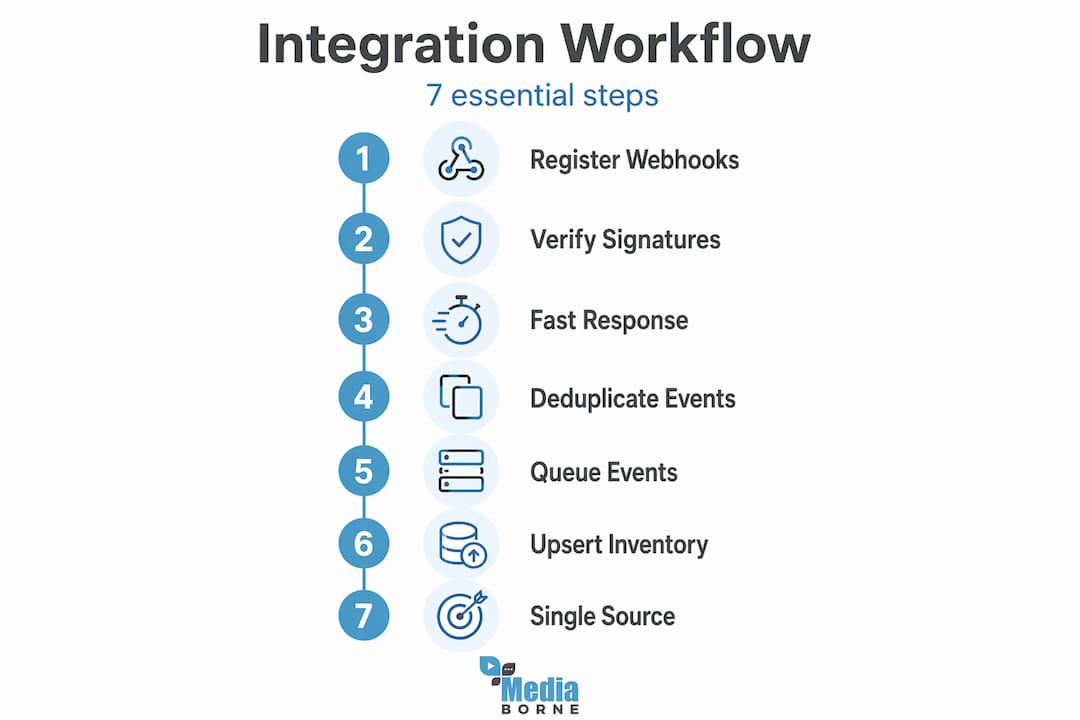
1. Register your webhooks with the correct topics. Subscribe to inventory_levels/update, orders/create, orders/paid, orders/cancelled, and refunds/create at a minimum. Use the Shopify Admin API or your app's setup flow to register these endpoints.
2. Verify every incoming webhook with HMAC signature checks. Shopify signs every delivery with a SHA-256 HMAC using your shared secret and the raw request body. You must verify this signature before processing anything. HMAC verification using the raw body is non-negotiable. Parsing the body before verification breaks the check.
3. Respond within 5 seconds. This is a hard constraint. Shopify will retry delivery if your endpoint does not return a 200 status within 5 seconds, and after 19 consecutive failures it deletes your webhook subscription entirely. Your handler should acknowledge receipt immediately and hand off processing to an async queue.
4. Use the X-Shopify-Webhook-Id header for deduplication. Because Shopify uses an at-least-once delivery model, your endpoint will receive duplicate events. The X-Shopify-Webhook-Id header uniquely identifies each delivery attempt. Store this ID with a unique database constraint before processing the event. If the insert fails, the event is a duplicate. Skip it.
5. Push events to an async queue. Once acknowledged, write the event payload to a queue such as AWS SQS or Google Pub/Sub. Your worker processes events from the queue at its own pace, retrying failures with exponential backoff rather than relying on Shopify's retry cycle.
6. Apply upsert logic in your inventory updates. Rather than simple inserts, use upsert operations keyed on Shopify's resource ID. This handles cases where events arrive out of order, which happens more than you expect during traffic spikes.
7. Maintain Shopify as the single source of truth. Never write inventory or order state directly to Shopify from two different systems simultaneously. Any write to stock levels must go through one authoritative process. Everything else should read from Shopify, not write to it.
Pro Tip: Sync delays over 30 seconds cause operational crises for high-velocity products. If your queue processing is taking longer than that, your worker count is too low or your processing logic is doing too much work per event.
Common mistakes that break shop integration
Even technically capable teams make the same errors repeatedly when building out multi-channel retail integration. Knowing where things go wrong is half the battle.
-
Synchronous processing of webhooks. Doing the actual inventory update or order processing inside your webhook handler, before responding to Shopify, guarantees timeout failures under load. The handler's only job is to verify, acknowledge, and enqueue.
-
Missing idempotency. This is the most costly mistake in practice. Idempotency strategies include storing the deduplication key before processing and using database unique constraints to enforce exactly-once semantics. Without this, a single order can be processed twice, causing double fulfilment, duplicate charges, or phantom inventory reductions.
-
Ignoring webhook subscription health. Shopify auto-deletes subscriptions after 19 consecutive delivery failures. If your endpoint goes down for maintenance and you do not restore subscriptions manually, you lose all events fired during that window. Those events are gone. There is no replay.
-
No dead-letter queue. Events that fail processing after multiple retries need somewhere to go. A dead-letter queue lets you inspect, debug, and reprocess failed events without losing data. Without one, failed events vanish and you discover the problem through customer complaints.
-
Forgetting to re-register webhooks after app reinstalls. Every reinstall creates a new session with fresh webhook subscriptions. If your onboarding flow does not re-register all subscriptions on install, you will operate silently without events.
"The most dangerous integration failures are the ones that look fine in your dashboard but are quietly dropping events. Build observability in from day one, not as an afterthought."
Safe retry strategies should use exponential backoff, starting at 1 second and doubling up to a maximum of around 5 minutes, with a jitter factor to avoid thundering herd problems. Pair this with a daily reconciliation job that compares order counts and inventory levels between Shopify and your downstream systems. Discrepancies surface integration gaps before customers do.
Verifying and optimising your shop integration
Getting your integration live is step one. Knowing it works correctly under real conditions is a different challenge.

Start with live event simulation. Shopify's developer tools let you trigger test webhook deliveries. Use these to confirm that your HMAC verification, deduplication logic, and queue processing all behave correctly end to end. Do not rely on unit tests alone. Simulated live events catch infrastructure issues that unit tests cannot see.
For scale testing, the critical metric is end-to-end latency from event fire to inventory update. Here is a practical benchmark to aim for at different revenue tiers:
| Monthly revenue | Target sync latency | Architecture recommendation |
|---|---|---|
| Under £50k | Under 30 seconds | Direct API polling or basic webhooks |
| £50k to £500k | Under 10 seconds | Webhook plus queue processing |
| Over £500k | Under 2 seconds | AWS EventBridge or Google Pub/Sub |
For mission-critical, high-volume flows, managed event buses like AWS EventBridge or Google Pub/Sub add built-in retry logic, fan-out capability, and detailed delivery monitoring. They are more infrastructure to manage, but the observability alone is worth it at scale.
Pro Tip: Set up automated monitoring that checks your registered webhook subscriptions daily. If any subscriptions are missing, your system should re-register them automatically without human intervention. This single automation has prevented more silent integration failures than any other measure in high-growth stores.
Event-driven integration reduces overselling events by more than 90% and directly improves customer trust and conversion rates. Given that 66% of consumers lose trust after a single oversell experience, the reliability of your integration is not just a technical concern. It is a commercial one.
What I have learned from real-world shop integrations
I have spent years working with fast-growth ecommerce businesses on this problem, and a few things stand out from the experience.
The biggest lesson is that idempotency is almost always left until something goes wrong. Teams build the happy path, ship it, and only revisit deduplication after seeing a customer get charged twice. By then, refunding and reconciling the damage costs far more time than building it correctly would have. Start with idempotency. It is not a performance concern. It is a correctness concern.
I have also seen governance arguments tear apart otherwise excellent integrations. Two teams, each convinced their system should own inventory. The result is conflicting writes, phantom stock, and a support queue that never empties. Defining data ownership is a business decision, not a technical one. Get it agreed in writing before you build anything.
Moving from batch to event-driven sync is one of the clearest wins I have seen in ecommerce platform integration. The reduction in overselling incidents is almost immediate. Customer trust metrics improve within weeks. The ROI calculation for stores doing above £500k in revenue typically comes in well under six months.
The trap most teams fall into during optimisation is chasing latency before fixing reliability. A 1-second sync that loses events is worse than a 10-second sync that never does. Fix correctness first. Then optimise speed. That sequence matters more than any specific technology choice.
— Stephen
Take your shop integration further with Mediaborne

Getting your shop integration technically sound is one half of the equation. The other half is making sure that when customers arrive, what they see actually converts them. Mediaborne specialises in social selling video production and ecommerce content that works alongside your integrated shop to turn browsers into buyers. From product films and live commerce formats to platform-native content built for TikTok and YouTube, the team creates content that fits directly into your social commerce strategy. If your integration infrastructure is solid and your content still is not converting, that is the gap Mediaborne is built to close. Explore Mediaborne's video production services to see how professional ecommerce content drives measurable sales growth.
FAQ
What is shop integration in ecommerce?
Shop integration connects your ecommerce platform to other systems, such as marketplaces, inventory tools, or point of sale systems, so that data like stock levels and orders stays accurate across all channels in real time.
How does event-driven sync differ from batch processing?
Event-driven sync updates inventory and order data within seconds of a change occurring, whereas batch processing runs on a schedule and can leave data out of sync for minutes or hours. For high-velocity products, sync delays over 30 seconds create significant overselling risk.
Why do Shopify webhooks need idempotent handling?
Shopify uses an at-least-once delivery model, meaning the same webhook can be delivered more than once. Without idempotent handlers, duplicate events cause double processing, resulting in incorrect inventory counts or duplicate orders.
What causes webhook subscriptions to stop working?
Shopify automatically deletes webhook subscriptions after 19 consecutive delivery failures. To prevent data loss, implement automated daily checks that detect and re-register any missing subscriptions without manual intervention.
How do I know if my shop integration is working correctly?
Use live event simulation through Shopify's developer tools to test end-to-end processing, monitor delivery success rates for each webhook topic, and run daily reconciliation jobs comparing order and inventory counts between connected systems.