

TL;DR:
- Effective social media management relies on a structured workflow that ensures each interaction is responded to promptly and consistently. Implementing clear ownership, automation for routine tasks, and focused engagement windows enhances audience trust and supports business objectives. Regular measurement and workflow reviews are essential for continuous improvement and maintaining high engagement quality.
Managing social media interactions without a defined social media engagement workflow is like running a customer service team with no rota, no scripts, and no manager. Replies go missing. Tone goes inconsistent. High-value leads get ignored while low-priority comments get three responses. For marketing professionals juggling multiple platforms, campaigns, and stakeholders, this kind of chaos quietly erodes audience trust and conversion rates. This guide walks you through building a workflow that covers planning, execution, automation, and measurement — so your team spends less time firefighting and more time building genuine audience relationships.
Table of Contents
- Key takeaways
- Setting up your social media engagement workflow
- The six-phase workflow process
- Scaling engagement without burning out
- Measuring your engagement workflow
- My honest take on engagement workflows
- Take your content to the next level
- FAQ
Key takeaways
| Point | Details |
|---|---|
| Structure prevents missed interactions | A phased workflow moves every message from identification to response and measurement without gaps. |
| Daily time-boxing beats constant monitoring | Two focused 20-minute engagement windows outperform all-day notification checking for both quality and team wellbeing. |
| Automation serves the routine, not the relationship | Use AI for categorisation and repetitive replies, but reserve human responses for complex, sensitive, or high-value conversations. |
| Metrics must connect to business outcomes | Track response time, resolution rate, and sentiment alongside conversion data to demonstrate real commercial impact. |
| Clear ownership stops stalled conversations | Every message thread needs an assigned owner. Without this, threads go cold and audiences disengage. |
Setting up your social media engagement workflow
Before you build a workflow, you need the right foundation. Most teams skip this step and wonder why their process collapses after a few weeks. The answer is almost always missing ownership, no shared tooling, or undefined objectives.
Start by clarifying what you actually want from engagement. Are you driving sales conversations? Handling customer support? Building community loyalty? Your answers shape every decision downstream. Once your goals are defined, map out who on your team is responsible for which phase of the workflow. Content creation, approval, scheduling, community management, and reporting should each have a named owner, not a vague "team responsibility."
Here is a breakdown of the core tool categories every team needs in place before launching a social media engagement workflow:
| Tool category | Function | Examples |
|---|---|---|
| Content calendar | Plan and organise posts by date, platform, and campaign | Notion, Trello, Airtable |
| Scheduling platform | Queue and publish content at optimal times | Buffer, Later, Hootsuite |
| Social inbox | Centralise DMs, comments, and mentions in one view | Sprout Social, Zoho Social |
| Analytics dashboard | Track performance metrics and report on outcomes | Metricool, native platform insights |
| Approval tool | Manage content sign-off with clear SLAs | Planable, ContentCal |
Efficient social engagement workflows centralise all messages into a unified inbox, use AI-driven categorisation, and integrate with CRM systems for lead management and revenue tracking. This single change alone prevents the most common failure in social engagement: messages falling through the cracks because they lived in three different apps.
Pro Tip: Set your social media objectives in the same meeting where you assign workflow roles. Objectives without owners get forgotten, and owners without objectives lose direction fast.
You should also decide early how much automation you want to introduce. AI tools can handle message capture, tagging, and basic qualification before a human ever sees a message. This does not mean removing the human element. It means your team arrives at each conversation with context already in place.
For teams thinking about AI in media production, similar principles apply: technology reduces the administrative burden so creative and strategic thinking can take centre stage.
The six-phase workflow process
A repeatable, staged engagement workflow moves every interaction from identification through to response and measurement. Here is how each phase works in practice.
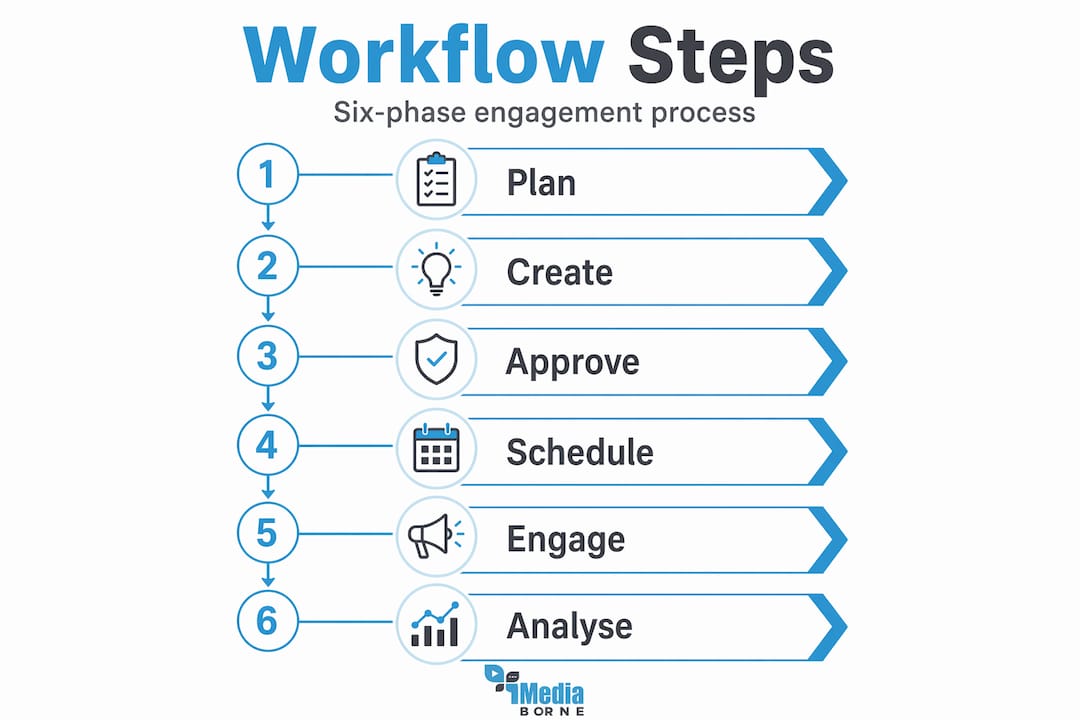
1. Plan Align your content themes with business objectives and audience insights. Review what performed well in the previous period, identify gaps, and map content ideas to specific platforms and formats. This phase produces your content calendar for the coming weeks.
2. Create Batch your content creation wherever possible. Writing and designing ten posts in one focused session is dramatically more efficient than producing one post per day. This phase also includes drafting response templates for common engagement scenarios, such as product questions, complaints, or partnership enquiries.
3. Approve This phase is where most workflows slow down. Structured approval processes with clear service-level agreements can cut content turnaround times by 40 to 60 per cent and reduce revision delays. Set a hard deadline for feedback: if no changes are requested within 24 hours, the content is approved by default.
4. Schedule Use your scheduling platform to queue approved content at optimal posting times for each platform. Do not simply copy the same post across every channel. Adapt the copy and format for each platform's context and audience behaviour. A LinkedIn post and a TikTok caption serve very different purposes, even if the underlying message is the same.
5. Engage This is the phase most teams underestimate. Rather than monitoring notifications throughout the day, schedule two 20-minute windows for focused engagement work. In each session, reply to comments, respond to DMs, and spend a few minutes on proactive engagement — commenting on industry conversations or acknowledging brand mentions.
Pro Tip: During your engagement windows, tackle DMs first, then comments, then mentions. DMs carry the highest commercial value and are the most time-sensitive.
6. Analyse At the end of each week or campaign cycle, review your engagement metrics against the objectives you set in the planning phase. Feed what you learn directly back into the next planning session. This creates a feedback loop that continuously improves both your social media strategy and the quality of your content.
Here is a quick reference for each phase:
| Phase | Primary objective | Key deliverable |
|---|---|---|
| Plan | Align content with goals | Approved content calendar |
| Create | Produce on-brand content | Drafted posts and response templates |
| Approve | Maintain quality and compliance | Signed-off content with SLA timestamps |
| Schedule | Optimise posting timing | Queued content per platform |
| Engage | Respond and build community | Resolved conversations and logged replies |
| Analyse | Measure and improve | Performance report with next-cycle recommendations |
Scaling engagement without burning out
Once your basic workflow is in place, the challenge shifts from getting organised to staying consistent as your audience grows. This is where automation and smart triage become essential.

Start with your inbox. A mature inbox workflow captures every message, categorises it by type and priority, qualifies it for commercial or support relevance, assigns it to the right team member, and schedules a follow-up if needed. Without this structure, high-volume accounts lose conversations daily. The 80/20 automation approach automates most repetitive DMs, reducing daily handling time from several hours to around 30 minutes. Use automation for link requests, pricing enquiries, FAQs, and delivery updates. Reserve human responses for complaints, sensitive topics, and high-intent leads.
You also need escalation paths. Triage and clear priority levels prevent your team from treating a minor comment with the same urgency as a payment dispute or a PR crisis. Define at least three tiers:
- Standard: General comments, likes, routine questions. Respond within 24 hours.
- Priority: Complaints, product issues, partnership enquiries. Respond within four hours.
- Urgent: Safety concerns, legal implications, crisis scenarios. Escalate immediately to the relevant senior team member or department.
Clear escalation protocols are critical for avoiding bottlenecks and ensuring prompt responses across high volumes of interactions. Without them, a team member dealing with an urgent thread has no one to pass it to and no process for doing so.
One often-overlooked detail: mature workflows assign ownership of entire conversation threads and log context so that if one person is unavailable, another can pick up seamlessly without asking the customer to repeat themselves. This reduces resolution time and prevents the frustration that kills customer loyalty.
For media-focused teams managing high engagement volumes, scheduled engagement windows and disciplined inbox triage follow similar logic to managing news feeds: you cannot process everything in real time, so you build a system that surfaces what matters most.
Pro Tip: Do daily backlog health checks. Scan for unassigned threads every morning before your first engagement window. Ghost conversations — messages that were seen but never assigned or replied to — are one of the most damaging and easily preventable failures in social engagement.
Measuring your engagement workflow
You cannot improve what you do not measure. But measuring the wrong things is just as costly as measuring nothing. The metrics that matter for a social media engagement workflow fall into two categories: operational and commercial.
| Metric | Category | What it tells you |
|---|---|---|
| Median response time | Operational | How quickly your team acknowledges incoming messages |
| Resolution rate | Operational | Percentage of conversations brought to a satisfactory close |
| Engagement rate | Operational | Level of audience interaction relative to reach |
| Sentiment score | Operational | Overall tone of audience responses toward your brand |
| Assisted conversions | Commercial | Revenue influenced by social engagement interactions |
Community management KPIs including median response time, resolution rate, and sentiment analysis, combined with assisted conversion data, give you the fullest picture of workflow health. Use a dashboard that pulls from your social inbox, scheduling platform, and CRM so you can see the complete journey from first comment to closed sale.
Establish benchmarks early. Without a baseline, you cannot tell whether a 12-hour response time is good or bad for your industry and audience size. Review benchmarks quarterly and adjust targets as your team and tooling mature.
Pro Tip: Connect your social inbox data to your CRM so that high-intent conversations automatically create or update lead records. This closes the loop between engagement and revenue, which is precisely the data your senior stakeholders want to see.
For further context on the metrics that drive social growth, social video engagement KPIs offer a useful framework that transfers directly to community management reporting.
My honest take on engagement workflows
I have seen marketing teams invest weeks building elaborate workflow documentation, only to find that three months later, nobody is following it. The documentation was not the problem. The problem was that the workflow was designed around tools and phases rather than around the humans using it.
In my experience, the most reliable workflows are the simplest ones. A clear owner per phase, a shared inbox, and two daily engagement windows will outperform any sophisticated process that requires ten tools and daily coordination calls. Complexity is the enemy of consistency.
I have also watched teams automate their way into audience distrust. Automated replies that miss the tone of a question, or bots that deflect complaints with templated positivity, do real damage to community trust. The 80/20 rule works precisely because it keeps automation away from the conversations that actually matter. If you are unsure whether a message type should be automated, the answer is usually no.
What I have found to be genuinely undervalued is approval workflow design. Teams obsess over scheduling and engagement tactics, but approval bottlenecks are where momentum dies. Assign one decision-maker per content category, set non-negotiable turnaround times, and remove multi-step sign-off chains wherever possible. The speed you gain here flows directly into your ability to respond to trends and audience behaviour in real time.
Finally, build in a quarterly workflow review from day one. What works for a team of three managing two platforms will not work for a team of eight managing six. Workflows need to evolve, and the best time to review them is before the cracks appear, not after.
— Stephen
Take your content to the next level
A well-designed social media engagement workflow creates the consistency your audience expects. But consistency alone does not capture attention. The content you put into that workflow matters just as much as the process around it.
Mediaborne works with brands to produce video content specifically built for social performance. From short-form clips to full production campaigns, the team understands what formats drive genuine interaction rather than passive scrolling. If you want content that earns engagement rather than requests it, explore Mediaborne's video production services and see how professional filming and editing can strengthen every phase of your workflow. For brands ready to go further, immersive video formats offer new ways to deepen audience interaction across platforms.
FAQ
What is a social media engagement workflow?
A social media engagement workflow is a repeatable, structured process for managing audience interactions across social platforms. It typically covers six phases: plan, create, approve, schedule, engage, and analyse.
How many daily engagement windows should a team use?
Two focused 20-minute windows per day are recommended over continuous monitoring. This approach improves response quality and protects team focus, without sacrificing responsiveness.
How do you prevent messages from being missed?
Centralise all messages into a unified social inbox with tagging, ownership assignment, and daily backlog checks. Ghost conversations, messages seen but never assigned, are the most common and preventable source of missed interactions.
What should be automated in a social engagement workflow?
Automate message capture, categorisation, and replies to routine queries such as pricing questions, FAQs, and link requests. Reserve human responses for complaints, sensitive topics, and high-intent sales conversations.
Which metrics matter most for engagement workflow performance?
Track median response time, resolution rate, engagement rate, sentiment score, and assisted conversions. Together, these metrics connect your team's operational performance to measurable commercial outcomes.